Hey everyone, if you’ve ever shopped around for PVC printing film (which I’m sure you have if you’re here), you’ve probably run into a sticky question—literally. Like, when you’re prepping your prints for things like window decals, storefront signage, or vehicle wraps, you start wondering: can this stuff actually be laminated? And no, I’m not just talking about slapping a clear sheet over it and calling it a day. As someone who’s been supplying PVC printing film for over 8 years now, I’ve fielded this question from small business owners, sign makers, even graphic designers who’ve never worked with this material before. So let’s break this down real—no textbook jargon, just the stuff I’ve learned on the floor and out in the field. PVC Printing Film
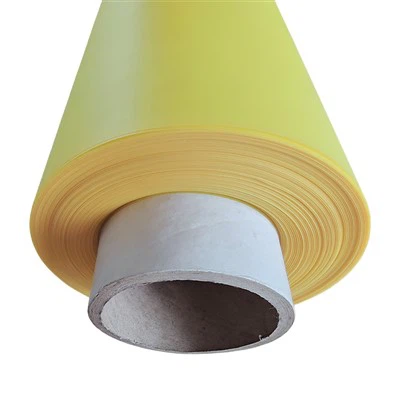
First off, let’s get one thing straight: PVC printing film 101, for anyone new here. PVC (polyvinyl chloride) is a super durable thermoplastic, right? It’s cheap, flexible, holds ink like a dream, and stands up to UV light way better than, say, plain paper. But when you print on it—whether it’s with solvent ink, eco-solvent, or UV-cured ink—you’re left with a thin, sometimes slightly tacky sheet that needs extra protection if it’s going outdoors or getting handled a lot. That’s where lamination comes in. Laminating is basically adding a thin clear layer over your print to stop scratches, fade, water damage, all that bad stuff. But here’s the catch: not every PVC film is made the same, and not every laminating job works. I’ve seen folks try to laminate a cheap, thin PVC print for a store sign and have it bubble up within a week—classic rookie mistake.
So back to the main question: yes, PVC printing film absolutely can be laminated. But only if you do it right. That’s the part most people miss. It’s not a one-size-fits-all scenario, which is why I’ve had so many questions over the years. Let me walk you through why it works, when it doesn’t, and what you need to do to make it work.
First, let’s talk about why lamination is actually a good idea for PVC prints. Like I mentioned earlier, PVC itself is durable, but the ink on top? Not so much. Eco-solvent ink is pretty tough, but leave a print out in direct sun for three months with no coating, and you’ll see it fade fast. Water can seep into the ink layers if it’s thin PVC, too, making it smudge or peel. Laminating adds a barrier. Plus, it adds a little rigidity, which is great for things like labels or small signs that need to hold their shape. I had a customer last year, a custom t-shirt shop, who used our matte PVC printing film for their store’s window promotion. They skipped lamination, and after a month of being in the sun, the yellow text on their sale sign was almost gone. Laminated a different print a few months later, and six months later it still looks like new. That’s the difference right there.
But wait—why does it sometimes go wrong? I’ve had plenty of customers come back frustrated saying their laminate bubbled, peeled, or turned cloudy. 9 times out of 10, it’s not the PVC film, it’s the process. Let’s get into the common mistakes, because I hear these all the time. First, not letting the ink cure all the way. If you print on PVC and try to laminate it an hour later, that ink is still wet (even if it looks dry). When you run it through the laminator, the heat and pressure make the ink shift, or get trapped under the laminate, leading to bubbling. I always tell people: wait at least 24 hours for eco-solvent prints, 12 for UV-cured (since UV ink cures almost instantly, but still needs time to set into the PVC’s surface). That’s non-negotiable.
Second, using the wrong kind of laminate. This is a big one. There are two main types of laminates you’ll run into: cold laminates and heat laminates. For PVC printing film, cold laminates are almost always the way to go. Why? Because heat laminates use high temperatures, and PVC is sensitive to heat. If you crank the laminator too hot, the PVC can warp, or the ink can melt. I’ve seen a print for a car wrap warp so bad it wouldn’t fit on the car because the laminator was set to 300 degrees instead of the recommended 150. Cold laminates don’t use heat—they use adhesive that activates when you apply pressure with a laminator roller. That’s way gentler on PVC. Also, matte vs gloss laminate? That’s personal preference, but matte is great if you don’t want that shiny, “plastic-y” look, while gloss makes colors pop. Just make sure the laminate is rated for use with PVC film—some laminates are made for paper, and they won’t adhere right.
Another mistake: not prepping the PVC film before lamination. You’d be surprised how much dust, lint, or even leftover ink residue is on a print after it comes off the printer. If you laminate over that, you get tiny bubbles or cloudy spots. I always tell customers to wipe their print gently with a lint-free microfiber cloth—no paper towels, those leave tiny fibers—maybe a little static duster, to get rid of any debris. If you’re working with a larger print, like a 5-foot window decal, use a soft squeegee to smooth it out as you go, so you don’t get air bubbles trapped. I keep a stack of microfiber cloths at my shop for exactly this reason—customers always forget to ask, and they end up using a napkin from their lunch.
Wait, but hold on—are there cases where you shouldn’t laminate PVC printing film? Let’s be real, nothing works for every situation. If you’re making a temporary indoor sign that’s only going to last a week, lamination is probably overkill. It’s an extra cost, and you don’t need the extra protection. Also, if you’re using PVC for something that needs to be flexible, like a temporary banner that gets folded up a lot, you want a flexible laminate. Some rigid laminates will crack when the PVC bends, so you have to pick the right flexible laminate for that. I had a customer who used our rigid PVC film for a trade show banner, used a rigid laminate, and when they folded it to put in the tube, the laminate cracked and peeled. They came back and swapped it for a flexible cold laminate, and it’s still going strong. That’s the call—know your end use before you pick your lamination material.
Now, let’s talk about the actual process, the step-by-step stuff I walk customers through every week, so you can avoid the mistakes I mentioned. First, pick your PVC printing film. Not all PVC is the same—we have calendered PVC and cast PVC, for example. Cast PVC is thinner, more flexible, better for wraps and decals, while calendered is thicker, more rigid, better for signs. Make sure whatever film you get is compatible with the ink you’re using. Most of our films work with eco-solvent, solvent, and UV inks, but it’s good to check.
Second, let the ink cure. Like I said earlier, 24 hours for eco-solvent, 12 for UV. Don’t skip this. I once had a customer who printed 10 window decals, tried to laminate them right after, and all 10 bubbled. They thought the film was bad, but it was just the ink not curing. They waited a day, did them again, and no issues. Easy fix.
Third, prep the work area. Make sure it’s dust-free—no open windows blowing in leaves, no fans that kick up lint. Lay your print flat, wipe it down with a lint-free cloth. Then, get your laminate. Cold laminate is your friend here. Peel a small part of the backing off the laminate, align it carefully with the top of your print, then slowly pull the rest of the backing off while using a squeegee to press the laminate onto the PVC as you go, pushing out any air bubbles. If you do get a bubble, you can poke it with a pin and smooth it over—just don’t stretch the laminate too much when you do that.
Fourth, run it through the laminator. Make sure your laminator is set to the right speed—too fast, and you get bubbles; too slow, and the adhesive might not activate right. For most PVC prints, medium speed works. Don’t cram a big print through the laminator too fast, take your time.
Now, what about long-term performance? I’ve had customers send me photos of their laminated PVC prints that are two, even three years old, still looking good. The key is using the right laminate. If you get an outdoor-rated laminate, it will stand up to rain, snow, sun, all that. Indoor laminates are fine for stuff that’s only going to be inside, but if it’s going outside, make sure your laminate is rated for exterior use. That’s a big one—indoor laminate will fade or peel if exposed to UV light, so don’t cut corners there.
Wait, I should address a concern some people have: does laminating affect print quality? No, not if you do it right. The laminate is clear, so it doesn’t change the color of the print. If you use a matte laminate, it will take away some of the shine, but that’s a choice, not a defect. Some people like that for a more professional look, like on store signs where too much gloss is distracting.
I know a lot of small business owners are worried about cost. Lamination adds to the total price of your project, right? But think about it: if you spend $100 on a PVC print for a store sign, and it fades in three months, you have to make a new one. If you spend an extra $20 to laminate it, it lasts two years. That’s way better value in the long run. I always explain that to customers who are hesitant about the extra cost—save money by not having to replace prints all the time.
Let me also clear up a myth I hear all the time: “PVC releases toxic fumes when laminated, so it’s bad for indoor use.” That’s only true if you’re using old, cheap PVC film or a low-quality laminate. Our PVC printing films meet all safety standards, and when you use a compatible, low-VOC laminate, there’s no fumes to speak of. I’ve had customers use our PVC prints with laminate for indoor window displays in small cafes, and they never get any complaints about smells. If you’re worried, just make sure you’re buying from a reputable supplier, not a random bulk site that sells cheap, untested materials.
Another thing: if you’re doing large format prints, like a whole wall mural or a building wrap, lamination is even more important. Those big prints are exposed to all kinds of weather, and they get handled a lot during installation. I worked with a sign company last year that did a building wrap for a local gym, printed on our cast PVC film, laminated with an outdoor cold laminate. They installed it in the spring, and it’s still perfect now, a year later. They said without lamination, the wind would have ripped the ink right off in the first storm.
So putting it all together: can PVC printing film be laminated? Absolutely. But only if you do it right—wait for the ink to cure, use a cold, PVC-compatible laminate, prep your surface, and use the right settings on your laminator. Skip those steps, and you’re going to have a bad time. Do them, and your prints will last for years, look amazing, and hold up to whatever you throw at them.
Now, if you’re in the market for PVC printing film, or you have questions about what kind of laminate works best for your project, my team and I are here to help. We’ve been doing this for years, we’ve tested every kind of laminate out there, and we can help you pick the right film for your needs, whether you’re making small labels, window decals, vehicle wraps, or big signs. Just reach out to us, we’re happy to answer any questions you have. No pressure, no sales pitch—just real advice from someone who’s been in the game a long time.
PVC Film References:
- Polyvinyl Chloride (PVC) Properties and Applications, Industrial Plastics Association, 2022.
- Laminating Best Practices for Large Format Prints, Sign Industry Association, 2023.
- UV and Eco-Solvent Ink Curing Times for Flexible Substrates, Printwear & Promotion Association, 2021.
- Adhesion Performance of Cold Laminates to PVC Printing Films, Journal of Vinyl and Additive Technology, Vol. 28, No. 3, 2022.
Nantong Dahe Composite New Material Technology Co., Ltd.
We’re well-known as one of the leading PVC printing film manufacturers and suppliers in China, specialized in providing high quality customized products to global clients. Please feel free to wholesale cheap PVC printing film in stock here from our factory. Contact us for quotation and free sample.
Address: South Side of Pinghai Highway, Pinghe Village, Dongshe Town, Tongzhou District, Nantong City, Jiangsu Province, China
E-mail: nantongdahe@outlook.com
WebSite: https://www.cndahetech.com/
